● Batch · Offline · One-time license

Convert documents in batches, on your own PC.

Okdo turns PDF, Office, images and web pages into any format you need — hundreds of files at once, with no upload to the cloud. Built for businesses that care about speed and privacy.

Windows 11 / 10 / 8 / 7 30-day money-back Lifetime license, no subscription

Why businesses choose Okdo

Batch conversionWhole folders at once
Command-line line26 headless tools
PrivacyFiles stay on your PC
Pro formatsICO · TGA · PCX · JP2
PricingBuy once, own forever
Batch & folder convertTurn 1,000 files into one format in a click.
100% offlineNothing is sent to a server. Compliance-ready.
Command-line readyScript it, schedule it, run it on a server.
Free trialDownload and convert before you pay.
One-time licenseNo monthly fees. Keep using it forever.
Built for real workflows

Three jobs free online tools can't do

Most converters are fine for one file. Okdo is built for the work that actually pays the bills.

⚙️

Batch & automation

For developers, IT and operations teams who convert at scale.

  • Convert whole folders and merge outputs
  • Command-line & server deployment
  • Schedule nightly conversion jobs
🔒

Privacy & compliance

For law firms, finance, healthcare and government.

  • Files never leave your machine
  • No cloud, no third-party access
  • Meets data-handling policies
🎨

Professional formats

For designers, print and archival teams with rare formats.

  • ICO, TGA, PCX, JP2, EMF, WMF
  • Multi-page TIFF / GIF handling
  • Custom color depth & sizing
Flagship converters

Start with a Professional edition

Our most complete tools — every format, batch mode and OCR included. For headless automation, see the 26 command-line converters.

ProfessionalBatch

PDF to All Converter

Batch convert PDF to Word, Excel, PowerPoint, image, HTML, TXT and 25+ formats with original layout kept.

$49.95$69.95one-time
ProfessionalOffline

All to PDF Converter

Create searchable PDFs from Office, images, HTML and URLs in batches — locally, with password protection.

$49.95$69.95one-time
ProfessionalBatch

All to PowerPoint

Turn PDF, Word, Excel, images and web pages into editable PPT / PPTX — perfect for slide reuse.

$49.95$69.95one-time
ProfessionalOCR

All to Word

Batch convert any file to editable Word / RTF, with built-in OCR for scanned images and PDFs.

$39.95$59.95one-time
All-in-oneOffline

Document Converter Pro

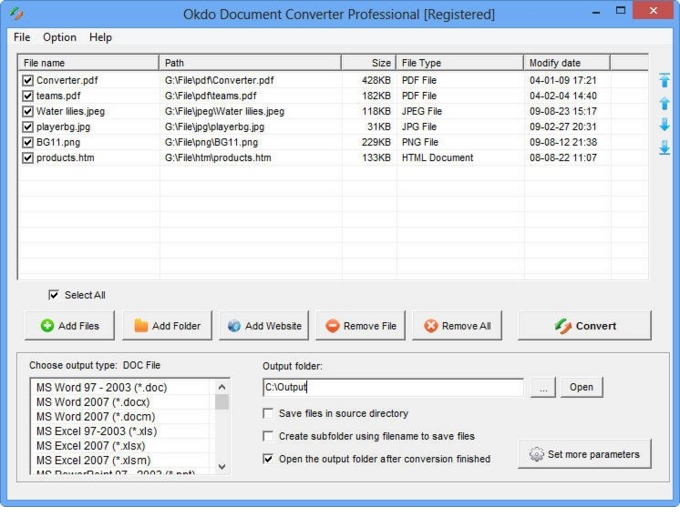
The complete toolkit — every format to every format, plus OCR and batch merge. A full GUI app; no command line required.

$79.95$129.95one-time
ProfessionalBatch

All to Image

Convert docs, PDF and web pages to JPG, PNG, TIFF, GIF, ICO and more — multi-page TIFF / GIF supported.

$49.95$69.95one-time
ProfessionalOCR

All to HTML

Batch turn documents, PDF and images into clean HTML — with OCR for image-only sources.

$25.95$45.95one-time
ProfessionalOCR

All to Text

Extract plain text from Word, Excel, PDF, images and websites in batches — OCR built in.

$19.95$39.95one-time
View all 194 converters →
Find your task

Browse by what you need to do

For developers & IT

Command-line converters — script, schedule, automate

26 headless converters you can run from a batch file, a scheduled task or a server pipeline. No GUI, no upload, full folder automation for document workflows.

Browse all 26 command-line tools →
Command-line examples

Automate any flagship converter from the terminal

Okdo's command-line converters share one interface. Drop the .exe into a script, a scheduled task or a server pipeline — your files never leave the machine. (Command-line automation ships with the dedicated command-line editions; the GUI Professional editions do not include it.)

PDF to All (CLI)

okdo-pdf-to-all-converter-command-line-demo.exe -file=C:\in.pdf -dest=C:\out.docx

All to PDF (CLI)

okdo-all-to-pdf-converter-command-line-demo.exe -file=C:\doc.docx -dest=C:\out.pdf

Batch a whole folder

okdo-pdf-to-all-converter-command-line-demo.exe -sourcefolder=C:\docs -format=docx -targetfolder=C:\out

Full options: -page-range, -password, -resolution, -image-quality, plus -? for help. Same syntax across the command-line editions. Browse all 26 →

By industry

Solutions for teams that handle sensitive files

⚖️

Law firms

Batch-convert case PDFs to Word for editing — entirely offline, nothing leaves the firm.

See converters →
🧾

Accounting

Export hundreds of statements to Excel in one pass, ready for audit and analysis.

See converters →
💻

Developers & IT

Command-line converters to automate document pipelines on your own servers.

See converters →
🎨

Design & print

Rare formats like ICO, TGA, PCX and JP2 that browsers simply can't open.

See converters →
Okdo vs free online tools

When "free" costs you more

CapabilityOkdo ProfessionalFree online converters
Convert 1,000 files at onceYes — folder batchOne at a time
Files stay on your PC100% offlineUploaded to a server
Command-line / automationYesNo
Rare formats (ICO, TGA, PCX, JP2)SupportedNot available
Ongoing costOne-time licenseAds / paid tiers / limits
Trusted since day one

Why Okdo

194
products & tools
25+
input & output formats
30-day
money-back guarantee
0
files uploaded to cloud
Questions

Frequently asked

No. Okdo runs entirely on your Windows PC. Your documents are never sent to the cloud, which is why law firms, banks and government teams use it.
Yes. Every product has a free download so you can convert and test before purchasing. The trial is limited in page count so you can verify quality first.
No. It is a one-time purchase — you own the license forever, including free minor updates. No monthly fees like Adobe Acrobat.
Yes — with our command-line converter line (26 headless tools). The GUI Professional editions are desktop apps without a command-line interface; automation is available in the dedicated command-line editions.
Windows 11, 10, 8, 7 and Vista. Office 2007–2021 / 365 formats are supported.

Convert your first 1,000 files — offline, today.

Download a free trial and see why teams pick Okdo over cloud converters.