PDF Merger
Okdo Split and Merge PDF lets you reorganise PDF files any way you like — split a large file apart, then merge pages back together into a new document. Everything runs offline on Windows, without Adobe Reader required.
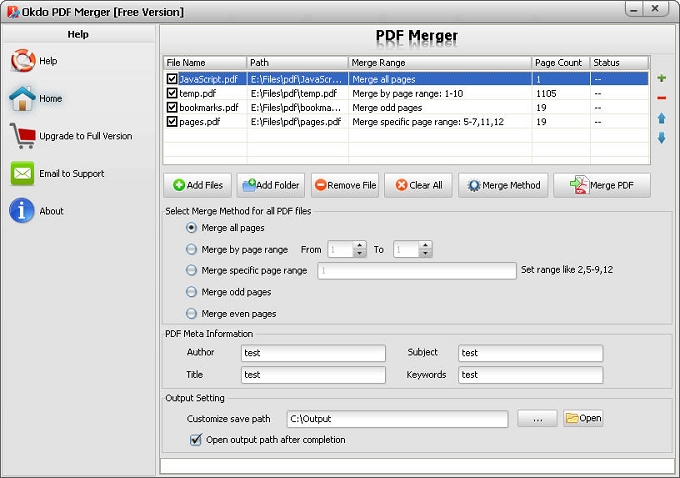
Key Features of Merge PDF
- Allow to drag and drop PDF or entire folder when adding files.
- Support the protected PDF.
- Up and Down button to adjust the order of merging pdf files.
- Easy to define new Author name, Title, Subject and Keywords for result document(s).
- It enables you to combine PDF files with different merging methods in order to satisfy different needs:
- 1. Merge all pages:
- Merges all the pages of the PDF files to the new merged document.
- 2. Merge by page range from a to b:
- Extracts only the page a to b from the source PDF file to the new merged document.
- 3. Merge by specific page:
- Extracts only the specific pages like (2,5-10,15) from the source file to the new merged document.
- 4. Merge odd pages:
- The final merged PDF file will contain only the odd pages i.e. 1st, 3rd, 5th, 7th, 9th and so on.
- 5 .Merge even pages:
- The final merged PDF file will contain only the even pages i.e. 2nd, 4th, 6th, 8th, 10th and so on.
- It has option to open result document after process completion.
- Customize a folder to save the output PDF files all together.
System Requirements
- OS: Windows 10 / 11 (64-bit recommended)
- Processor: 1GHz Intel/AMD processor or above
- RAM: 256MB RAM (512MB or above recommended)
- Free Hard Disk: 100MB space for installation
Supported formats
➡️ Input
Adobe
PDF (*.pdf)
⬅️ Output
Adobe
PDF (*.pdf)
Why convert with Okdo
What customers say
Switched our team to PDF Merger and the batch conversion alone saves us hours every week. Free updates are included with the license.
Dropped in a folder of Adobe PDF (*.pdf) → Adobe PDF (*.pdf) files and it was done — refreshingly simple. Handles encrypted and password-protected documents.
It handled our password-protected PDFs without any drama. Batch mode processes whole folders in one click.
We handle confidential client files, so PDF Merger running 100% offline was the dealbreaker. Runs entirely offline, no internet connection required.
Compared three converters; PDF Merger was the only one that preserved our layout on Adobe PDF (*.pdf) → Adobe PDF (*.pdf). Free updates are included with the license.
Converted a 300-page document in seconds. No Adobe Acrobat dependency to install or maintain.