GIF to DOC Converter
Okdo GIF to DOC Converter converts images into Word directly on your Windows PC. Process whole folders in one batch. Everything runs offline, so your files never leave your computer.
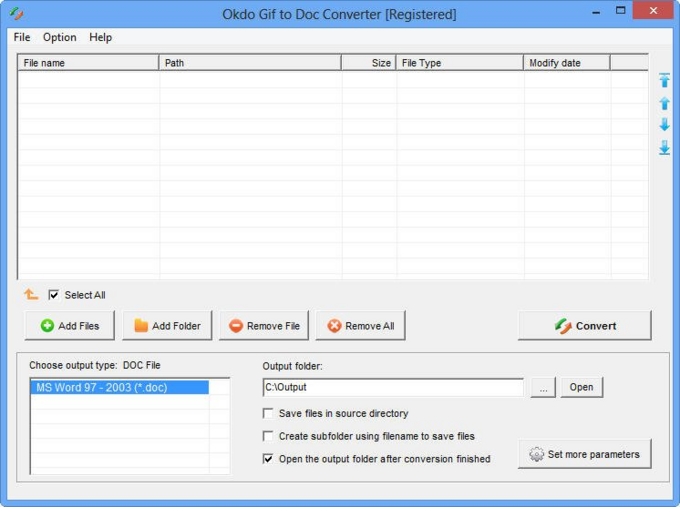
Key features
Advanced capabilities
- ✓Convert numerous gif format files to editable doc document once to save your time.
- ✓Supports Optical Character Recognition(OCR), convert your image files to editable Word document.
- ✓The OCR engine supports English, French, German, Italian, Spanish, Portuguese, Swedish, Romanian, Indonesian, Dutch, Polish, Danish, Turkish, and more.
- ✓Batch Convert Gif to doc.
- ✓Convert one multi-page GIF file to one multi-page Word.
- ✓Customize the output file name.
- ✓Save list: Save the converted files to a reusable list.
- ✓Load list: Load a saved list and convert its files directly.
- ✓Customize the Word margin and page size.
- ✓Add an entire folder for batch conversion.
- ✓Optionally opens the output folder automatically when conversion completes.
- ✓Saves output files to the same folder as the source files.
- ✓Saves each converted file to a separate subfolder within the output folder.
Supported formats
➡️ Input
Image File *.gif
⬅️ Output
MS Office Document
Word (*.doc) Screenshot
Why convert with Okdo
What customers say
Free online tools choke on large files and upload everything to the cloud. GIF to DOC just works locally. Fast enough for daily, high-volume workloads.
Dropped in a folder of Image File *.gif → MS Office Document Word (*.doc) Screenshot files and it was done — refreshingly simple. Fast enough for daily, high-volume workloads.
As a Graduate Researcher, I needed something I could trust with sensitive documents. GIF to DOC delivered. Runs entirely offline, no internet connection required.
Support replied within a day when I had a question about Image File *.gif → MS Office Document Word (*.doc) Screenshot. Smooth experience overall.
We handle confidential client files, so GIF to DOC running 100% offline was the dealbreaker. Files never leave the PC — ideal for compliance.
Great value for a one-time purchase. Clean interface with practically no learning curve.