PDF Tools Platinum
Okdo PDF Tools Platinum bundles the everyday PDF utilities — splitting, merging, encrypting and more — into one offline Windows toolbox. Handle sensitive files locally without sending anything to the cloud.
Key Features of Split PDF
- Allow to drag and drop PDF or entire folder when adding files.
- Split password-protected PDF file in seconds.
- It support select spliting methods for each PDF file flexibly:
- 1. Split by every n pages:
- This split mode allows you to divide a multi-page PDF file into several PDF files with n pages per file.
- 2. Split averagely to n PDF file:
- It enables you to split multi-page PDF file averagely to several PDF files with equal page numbers.
- 3. Split specific page ranges to a single PDF file:
- lets you flexibly choose the specific pages you want to extract from the multi-page PDF file and combine them into a single new PDF file.
- 4. Split multi-page PDF file to multiple PDF files:
- It enables you to divide target PDF file into multiple PDF files by specific page ranges chosen by users. You can differentiate the parameters with semi-colon (;) to split and create many files with different page requirements.
- 5. Remove special pages from PDF:
- By selecting range, you can remove unwanted PDF pages or useless parts.
- 6. Split each odd page to single PDF:
- Select this option when you want to extract only the odd pages from the PDF file.
- 7. Split each even page to single PDF:
- Select this option when you want to extract only the even pages from the PDF file.
- Supports create separate output folder for each source PDF.
- Supports save the output PDF files into the folder where the source file is.
- It has option to open result document after process completion.
- Customize a folder to save the output PDF files all together.
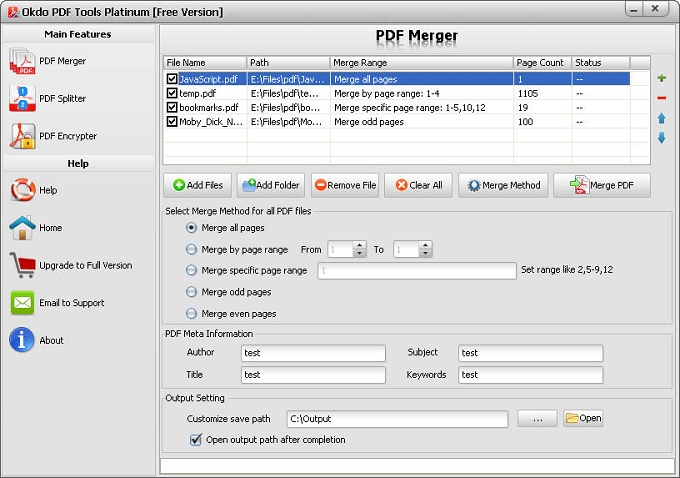
Key Features of Merge PDF
- Allow to drag and drop PDF or entire folder when adding files.
- Support the protected PDF.
- Up and Down button to adjust the order of merging pdf files.
- Easy to define new Author name, Title, Subject and Keywords for result document(s).
- It enables you to combine PDF files with different merging methods in order to satisfy different needs:
- 1. Merge all pages:
- Merges all the pages of the PDF files to the new merged document.
- 2. Merge by page range from a to b:
- Extracts only the page a to b from the source PDF file to the new merged document.
- 3. Merge by specific page:
- Extracts only the specific pages like (2,5-10,15) from the source file to the new merged document.
- 4. Merge odd pages:
- The final merged PDF file will contain only the odd pages i.e. 1st, 3rd, 5th, 7th, 9th and so on.
- 5. Merge even pages:
- The final merged PDF file will contain only the even pages i.e. 2nd, 4th, 6th, 8th, 10th and so on.
- It has option to open result document after process completion.
- Customize a folder to save the output PDF files all together.
Key Features of Encrypt PDF
- Its easy-to-use interface allows you to encrypt PDF files by simply few clicks.
- Allow to drag and drop PDF or entire folder when adding files.
- Set permissions to all the PDF in your archive in batches.
- It can be used to protect your PDF files with user and master passwords.
- Set open or user passwords to protect PDF from unauthorized opening.
- Set master passwords, preventing your PDF files from Printing, Editing, Coping, and Changing.
- Support 128-bit PDF encryption protection.
- It has option to open result document after process completion.
- Supports save the output PDF files into the folder where the source file is.
- Customize a folder to save the output PDF files all together.
System Requirements
- OS: Windows 10 / 11 (64-bit recommended)
- Processor: 1GHz Intel/AMD processor or above
- RAM: 256MB RAM (512MB or above recommended)
- Free Hard Disk: 100MB space for installation
Supported formats
➡️ Input
Adobe
PDF (*.pdf)
⬅️ Output
Adobe
PDF (*.pdf)
Why convert with Okdo
What customers say
Compared three converters; PDF Tools Platinum was the only one that preserved our layout on Adobe PDF (*.pdf) → Adobe PDF (*.pdf). Free updates are included with the license.
As a Project Coordinator, I needed something I could trust with sensitive documents. PDF Tools Platinum delivered. Preserves the original layout, fonts and images.
Great value for a one-time purchase. Runs entirely offline, no internet connection required.
Free online tools choke on large files and upload everything to the cloud. PDF Tools Platinum just works locally. Free updates are included with the license.
Converted a 300-page document in seconds. Files never leave the PC — ideal for compliance.
Switched our team to PDF Tools Platinum and the batch conversion alone saves us hours every week. Files never leave the PC — ideal for compliance.