PowerPoint to JPEG Converter
Okdo PowerPoint to JPEG Converter is a focused Windows tool that converts PowerPoint into images. Process whole folders in one batch. Everything runs offline, so your files never leave your computer.
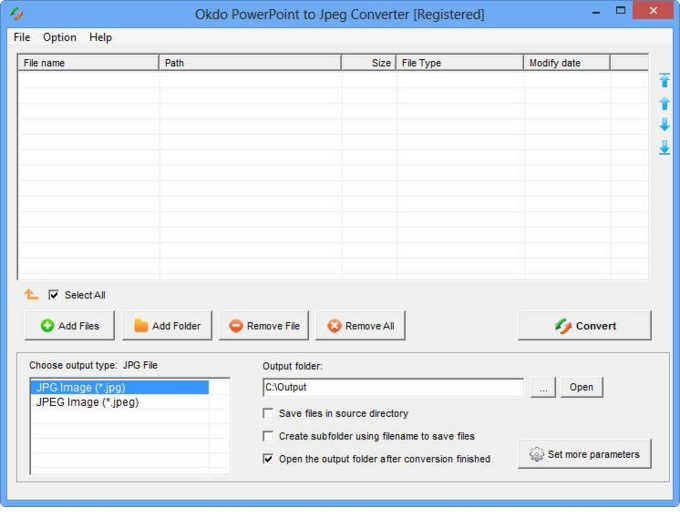
Key features
Advanced capabilities
- ✓Simultaneously convert massive ppt/ppx/pptm format files to jpeg/jpg once to save time.
- ✓Fine-tune the output image quality.
- ✓Apply an image watermark.
- ✓Specify the output image page size.
- ✓Add an entire folder for batch conversion.
- ✓Supports to add files by dragging and dropping.
- ✓Optionally opens the output folder automatically when conversion completes.
- ✓Saves output files to the same folder as the source files.
- ✓Saves each converted file to a separate subfolder within the output folder.
Supported formats
➡️ Input
MS Office Document
PowerPoint (*.ppt, *.pptx, *.pptm)
⬅️ Output
Image File *.jpg, *.jpeg Screenshot
Why convert with Okdo
What customers say
Dropped in a folder of MS Office Document PowerPoint (*.ppt → Image File *.jpg files and it was done — refreshingly simple. Runs entirely offline, no internet connection required.
We bought the one-time license and never looked back — no subscription, free updates. Clean interface with practically no learning curve.
We handle confidential client files, so PowerPoint to JPEG running 100% offline was the dealbreaker. Handles encrypted and password-protected documents.
As a Prepress Operator, I needed something I could trust with sensitive documents. PowerPoint to JPEG delivered. Files never leave the PC — ideal for compliance.
It handled our password-protected PDFs without any drama. Files never leave the PC — ideal for compliance.
Compared three converters; PowerPoint to JPEG was the only one that preserved our layout on MS Office Document PowerPoint (*.ppt → Image File *.jpg. Runs entirely offline, no internet connection required.